Mistakes to Avoid
Do NOT power on your node without an antenna!
Very self-explanatory, just don't try it! It can damage your node's LoRa chip permanently.
Antenna Height Matters
Antenna elevation is one of the biggest factors in how well a mesh network performs. LoRa signals travel line-of-sight, so the higher your antenna, the farther your signal reaches and the more nodes you can connect with. Even a modest elevation gain like a rooftop, upper floor window, or attic can dramatically extend your range. If you can get a node onto a tall building or any elevated structure, please do. Every high-mounted node makes the network better for everyone.
Mount antennas upright and minimize cable length between the node and antenna.
Having your antenna in a vertical position at the highest possible level is the best case. Also, small adjustments such as keeping the cable connecting the antenna to the node as short as possible will help. Keeping the cable vertical and not bent will ensure you get the best connection possible; antennas with a hinge typically perform worse while bent. If you do need to separate the antenna from the node with a longer run of coax, keep in mind that most coax has significant signal loss over distance. Do your research and buy the best coax you can afford.
Avoid sketchy batteries
18650 Batteries are very common in MeshCore builds for their large capacity and rechargability. They are lithium-ion batteries first created for use in laptops. Many fake or misleading manufacturers will sell batteries that are way above their capacity. Stick to name brands like Samsung or Panasonic. A big hint that a battery is fake is if the weight is under 40 grams. 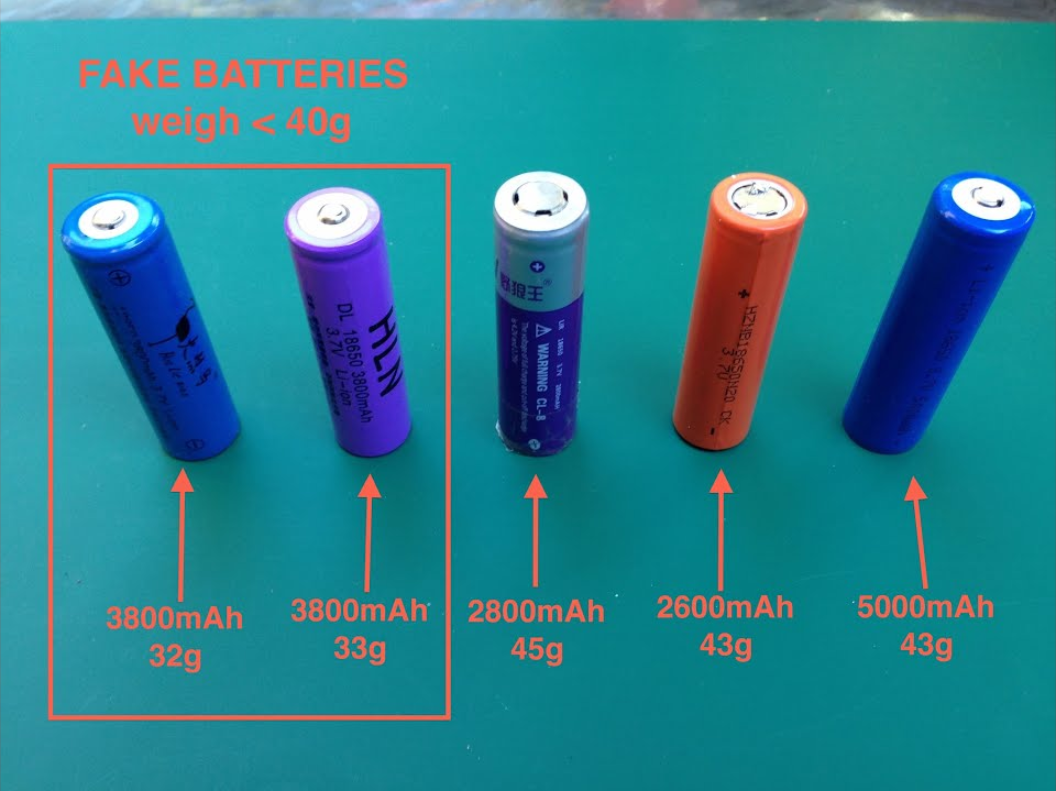
Pay attention to SMA cables
When you are purchasing SMA cables and adapters make sure you check the gender of the antenna and cables you're going to use. Mismatched connectors may cause permanent damage to your node, possibly leaving it unusable.
Avoid using stock Lilygo or Heltec antenna
Using the stock antennas from Lilygo and Heltec devices will result in a massive performance loss because of their very high SWR. The lower SWR the better. We recommend checking out this GitHub repository for choosing the best antenna for your node.
Set up an admin password on Repeater and Room Server nodes
If you are deploying an infrastructure node, we strongly recommend setting up the admin password so you can control your node through another node wirelessly. Instructions for this are available here. The guest password should either be left blank or set to hello.
Do not use the Room Server role unless absolutely necessary
The Room Server role should be reserved for nodes with poor placement, for example, inside of an apartment building where repeater mode simply isn't workable. Room Servers store messages like an old-school BBS system, which sounds useful but comes with a significant limitation: they only work reliably when all users are within 1–2 hops of the room server. If you are deploying a stationary node on a building, please use the Repeater role, it will route packets much better than Room Server. If you're unsure which role to choose, please join our Discord and ask!
Watch out for "with display" vs. "without display" firmware builds
Some devices have separate firmware builds depending on whether they have a physical display. This is usually obvious when flashing, but it matters for one important reason: the default BLE PIN is different between the two variants. If you're setting up a companion node and can't pair via Bluetooth, double-check that you flashed the correct build for your hardware.
Do NOT flash the sensor firmware
If sensor firmware appears as an option for your device, do not use it for a general mesh node. Sensor firmware is a starting point for developers, to use it properly, you need to fork the codebase, add your own custom sensor telemetry collection logic, and build your own firmware from source. Out of the box, it will not behave like a normal mesh node. Stick to the standard repeater or companion firmware unless you know exactly what you're doing.